Th, 9/11: Audience analysis (memos)

Today we are primarily focused on workshopping your memos, which we’ll do in stages.

First, you’ll first spend 5 minutes individually reading Group 1’s memo and data. Next, you’ll spend 5 more minutes sharing your thoughts in small groups and commenting on the memo. We’ll then reconvene as a large group for 5 more minutes to debrief. We’ll repeat this process with Group 2 and so on. Because I uploaded each memo to Google Docs, you should be able to make comments and edits right in the doc, which everyone can see. I’ll show you how to use these features before we start. Here are the memos and data:

Group 1 –social media in the workplace: [memo] [data]
Group 2 –cloud-based options: [memo] [data]
Group 3 –video conferencing: [memo] [data]
Group 4 –online collaboration sites/software: [memo] [data]
Group 5 –web design: [memo] [data]

As you read these, consider the following process:

  1. First, individually read the data a few times. Then, ask yourself: what does the data say? What does it not say? That is, what can it not tell me?
  2. Then, read through the memo. What does the group focus on? Was is the same points you saw? Different? In other words, how did the group interpret this data? Do you agree with it?  Are there are there alternative explanations for the data? Does the data ever make interpretation difficult?  Discuss these questions in your small groups.
  3. Finally, think about how you might actually use this data as someone who will be graded on making a case for a certain kind of tech briefing. Would this memo be helpful in making that case? Let this question guide many of your comments.

T, 9/9: Audience Analysis (data)

Today we are aiming to get through 3 tasks and start a 4th, all dependent on your surveys. Remember, we are meeting in HBC 227 today!

1. Take surveys. Below you’ll see links to each group’s survey. Sign in to one of the computers in the cluster or use your own to take every survey, including your own. This should take no longer than 20-25 min.

Links:
Group 1 (social media in the workplace):  https://docs.google.com/forms/d/1pxsW2SBSygPKWS0fOxYq3BCbsmqpA0yuBlAfCUTt7Bs/viewform?usp=send_form

Group 2 (cloud-based options): https://docs.google.com/forms/d/1SB2EKIocQ8sqDQMiFVhDQHZU5tuabeFu0_RjyspVwGo/edit?usp=sharing

Group 3 (video conferencing): https://docs.google.com/forms/d/1U-R3ZSMvzmdCT_3tKWNFjj6kkGjzGl8lTxsk-LLhcdo/viewform?c=0&w=1&usp=mail_form_link

Group 4 (online collaboration sites/software):  https://docs.google.com/forms/d/1gaV4LBsoGnfXImstIWPipzYzPbLAErdqRd5FwLlUvuw/viewform?c=0&w=1&usp=mail_form_link

Group 5 (web design):  https://docs.google.com/forms/d/1b2eg8f89SvcXhpJbPmNuHdk0OmbuzHHb16cMe5lnYvs/viewform?usp=send_form

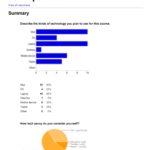
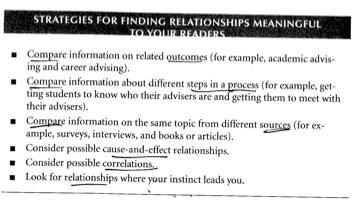
2. Process your data. Once everyone has taken all the surveys, work together with your group to view the “summary of responses” in Google Forms (to access this, go to the Form menu). Although the raw data is available in spreadsheet form, the bonus feature with Google Forms is that it will visualize the data with charts or diagrams. Look over this data with your group. It might help to look at Guideline 3 on p198 in Technical Communication. Specifically this table:

strategies

3. Interpret your data. As you discuss how to make sense of your data, make room for alternative explanations (p199) and uncertain conclusions (p200). Ultimately, consider how the patterns and possibilities will affect your readers’ upcoming decision: to propose a tech briefing to the class. Explain the significance of your data and entertain some recommendations based on this.

4. Draft a memo. Before next class, send the class a pdf of a memo that summarizes your survey results and makes recommendations, drawing from some of the methods discussed in Chapter 7.  Use the format on pp 550-52 to help you design it. This memo should communicate key insights from your survey; that is, those that are most relevant to the next task: proposing a tech briefing project. As you do this, keep your audience in mind; you should ask yourselves: how could our data be useful to our peers as they consider drafting a TB proposal? This doesn’t mean you should ignore specifics (i.e. the data), but should think carefully about how your are ordering information in your memo. In fact, be sure to attach a pdf of the “summary of responses” — the visualized data — so the class can scrutinize your interpretations.

Th, 9/4: Survey design

Today we’re aiming to get through 5 main tasks:

1. Discuss feedback on your bios. I tried something a little different this time in responding to all of your bios in one file rather than sending them out individually. This way you can see comments on your own bio, but also those of your peers. (Note that I did not, of course, include grades in this document.) The document is stripped from all formatting, so I could respond to the text of your bio in the Word; but I did refer to the actual course site to see how you formatted your bios and if you included a picture. A few quick patterns I noticed about these bios:

  • You all have a list of very interesting accolades. I was not so accomplished when I was your age. I’m really looking forward to building from and using these work experiences in our class this semester.
  • They were well written at the sentence level. There were very few mechanical, spelling, or usage errors.
  • Some folks did not include pictures of links, which felt like a lost opportunity.
  • Some had trouble prioritizing information — putting the more important info first or writing their bios chronologically. That said, many of you were aware that you were trying to impress each other with the prof writing experiences you did have.

2. Go over the Tech Briefing (TB) requirements

3. Learn how to make an effective survey. Here we’ll review key points from “Conducting a Survey” (from 188-193 in Anderson). Here’s a pdf of my keynote.

4. Learn about Google Forms. We’ll view a video from Google about Google Forms, and I’ll demo with a quick tutorial with the survey I made at the beginning of this course.

5. Practice designing surveys. 

  • As a large group: Let’s develop some categories, topics, niches, or other language for generalizing about kinds of technology that assists with either the writing process or the production of writing in the workplace. From this, let’s narrow it down to five key ones.
  • In assigned groups: Create an effective survey using Google Forms. Be sure to email me your survey link before next class since I’ll be posting them here on the course site. Remember, this counts as part of your grade for the Audience Analysis assignment in the Onboarding unit.

Groups

Group

1

2

3

4

5

Survey topic

Kelly

Anisha

David

Kalia

Julia

Audriana

Alina

Lexi

Andrew

Francisco

Rachel

Mark

Tim

Lucas

Ethan

Kathryn

 Hohon  Tian  Evan

Th, 8/28: Bios & Helvetica

We have 2 things to accomplish today:

  1. Share and upload bios.
  2. Watch clips from Helvetica (2007).
1. Share and upload bios.

Once I assign your groups, get together, grab your device, and go to this Google Doc:  http://goo.gl/Fgr2mM. Find your group on the doc and click the Meet the Team link next to it. What do you notice about this example in terms of structure? Are they similar or different? What information is shared and in what order? Spend no more than 10 minutes on this.

Once you discuss this as a group, paste your bios and photos underneath your group’s label in our Google Doc. Spend 20 minutes reading these and asking each other:

  • Are the bios consistent in terms of structure? Length? Design (font size, photo size, layout, etc.)?
  • Are they concise? Is the diction (i.e. word choice) appropriate for a general professional audience?
  • Are they written in 3rd person (he/she)?
  • Are there links? To where?
  • What do we find out about each other from these?
  • What do we want to know more about?

Finally, as a large group we will talk about some your observations, successes, and challenges with this activity. This afternoon I will upload these to our Meet the Team page. As the Onboarding schedule notes, you should add a comment on this page, networking with at least 3 students (please use your name so I know who commented). If someone comments on your bio, respond to them in the appropriate thread. Let’s aim to have a conversation going by the time we meet on Tuesday.

2. Watch Helvetica (2007).

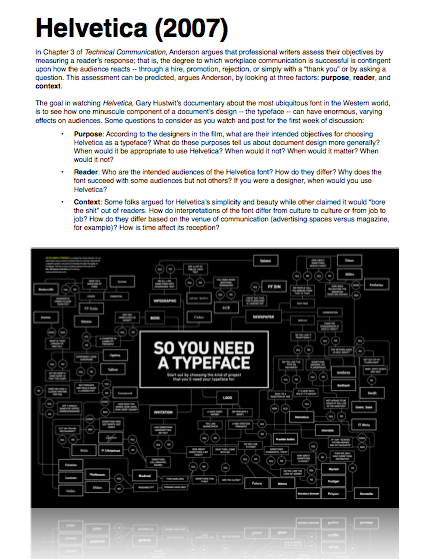
Use the following handout to frame your viewing of the film. Take notes by writing down time marks and quotations and we’ll discuss the questions on Tuesday.

Screen Shot 2014-08-27 at 4.23.56 PM


Bio criteria from class

Format

  • 200 words max
  • 150 min
  • 3rd person (he/she)
  • 1 
  • name first in bold
  • 1-2 relevant links
  • photo — under 500 kb

Content

  • Organizations you are involved in
  • What you did over the summer
  • Professional goals
  • Skillz w/ regard to professional writing (think about how these skillz might benefit others here)
  • Experience with different technology
  • Personal achievements
  • Fun fact
  • Hometown

T, 8/26: Survey, Bios

Today you will do 3 things:

  1. Introduce yourselves and listen to an overview of the syllabus
  2. Discuss yourselves in relation to professional writing
  3. Begin drafting bios
1. Introduce yourselves

First, you will attempt two kinds of introductions, one more intimate and the other more aggregative; that is, after you spend time exchanging names, majors, and career plans, you will turn to the data you provided in your surveys. Before you do that, though, I’ll provide an overview of the syllabus.

2. Discuss yourselves in relation to professional writing

We’ll first take a minute to make sure everyone completed a survey. You’ll then look over Google’s response summary from the survey I sent you. With a partner, come up with some tentative answers to the following question:

What patterns do you notice with this dataset and what might they say about the experiences and goals of the members of this class, especially when it comes to professional writing?

Let’s also try to define professional writing and reflect on some of the ways you’ve already begun to learn how to write like one.

3. Begin drafting bios

At the top of this page, you’ll notice a Meet the Team link. At the moment, I’m the only person listed. While we can certainly use my bio as a template, I’d rather have us talk about what we’d like there (we should also acknowledge that writing these ain’t easy, as the Tweets to the right can attest).

As this Smashing Magazine article makes clear, the point of a team page is to establish credibility with outside audiences; however, since we don’t have any outside audiences, our goal is to establish credibility with each other — and to have some fun doing it. So let’s look at that article and review some of the basic trends, then develop our own criteria, which I’ll post on the course site.

If there’s time, you should begin drafting a bio using this TinyMCE editor.  Once you have a draft, grab the html code by cutting and pasting the “Source” button (see image below). This is important as I will use the html to code our page on this course site.
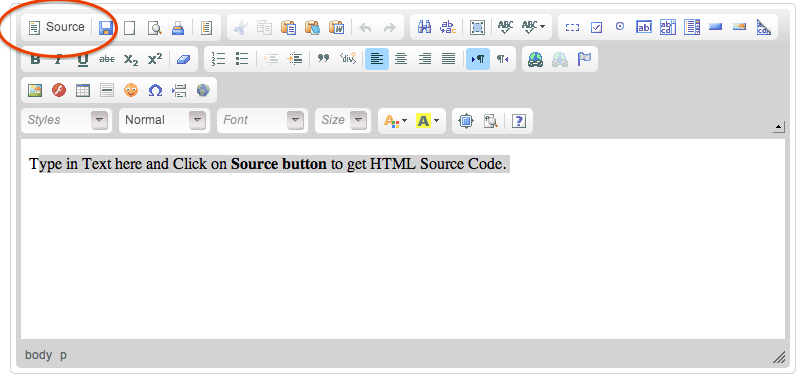
Screen Shot 2014-08-25 at 10.19.59 PM

Once you’re happy with your design (in class or not), grab the html by copying and pasting it into a new document that you’ll have access to class on Thursday. Also for Thursday, read “Chapter 3: Defining Your Communication’s Objectives: Purpose, Reader, Context” and pp 5-10 (“Characteristics of workplace writing”) in our textbook. In class, we’ll review the bios and watch and take notes on Helvetica (2007), considering how the film presents a rhetorical analysis of typeface.